Instead of manually reshuffling NBA player rankings every time your draft board changes, build a 2026 fantasy draft cheat sheet that matches your league’s scoring and removes drafted players from view. Start with SportsOrca’s NBA player rankings by position, then make the sheet answer the question a general ranking cannot: who fits your next pick?
- SportsOrca’s NBA player rankings are a starting point for a fantasy draft cheat sheet, not a finished draft order.
- Match the sheet to your league’s scoring before assigning priority to any player.
- Track position, category fit and drafted status so your next available pick stays visible.
- Refresh injury and role information before the 2026 draft; a saved ranking does not update itself.
Why this matters
The clock starts. The player at the top of your list is gone. A static ranking gives you another name, but it does not tell you whether that player helps the categories you need or fits the roster spot you can fill.
SportsOrca’s NBA rankings work best for fantasy drafters who want a starting order they can adapt to their own league. The advantage is a clear player-by-position reference. The limit is just as clear: an editorial ranking cannot know your scoring settings, roster requirements or earlier picks. Your cheat sheet has to supply that context.
In 2026, keep the process separate from the predictions. Rankings help you identify players to consider. Your league settings decide how to value them. The live draft board decides who remains available.
Before you start
- Have your league settings open. Record whether scoring uses total points or categories, which categories count, and which roster positions you must fill. Do this before sorting players.
- Open a 2026 player ranking and an editable spreadsheet. You need player names and positions for the first pass. Do not assume a ranking page offers a downloadable file; entering names manually works.
- Check position eligibility in your fantasy league. A ranking’s listed position and your league’s eligible positions are not necessarily the same. Use the league’s eligibility rules in the sheet, or the mismatch will surface when you try to make a pick.
The NBA regular season has 82 games, but a player’s ranking is not a promise of 82 appearances. Keep schedule context, health information and league scoring distinct rather than collapsing them into one unexplained number.
Set up your 2026 draft board
The first job is not forecasting. It is making a board you can read while the draft moves. Use one row per player and keep the original ranking visible even after you change your own priorities.
- In Google Sheets, select Blank spreadsheet. Give the file a recognizable 2026 draft name so you do not open an older board during the draft.
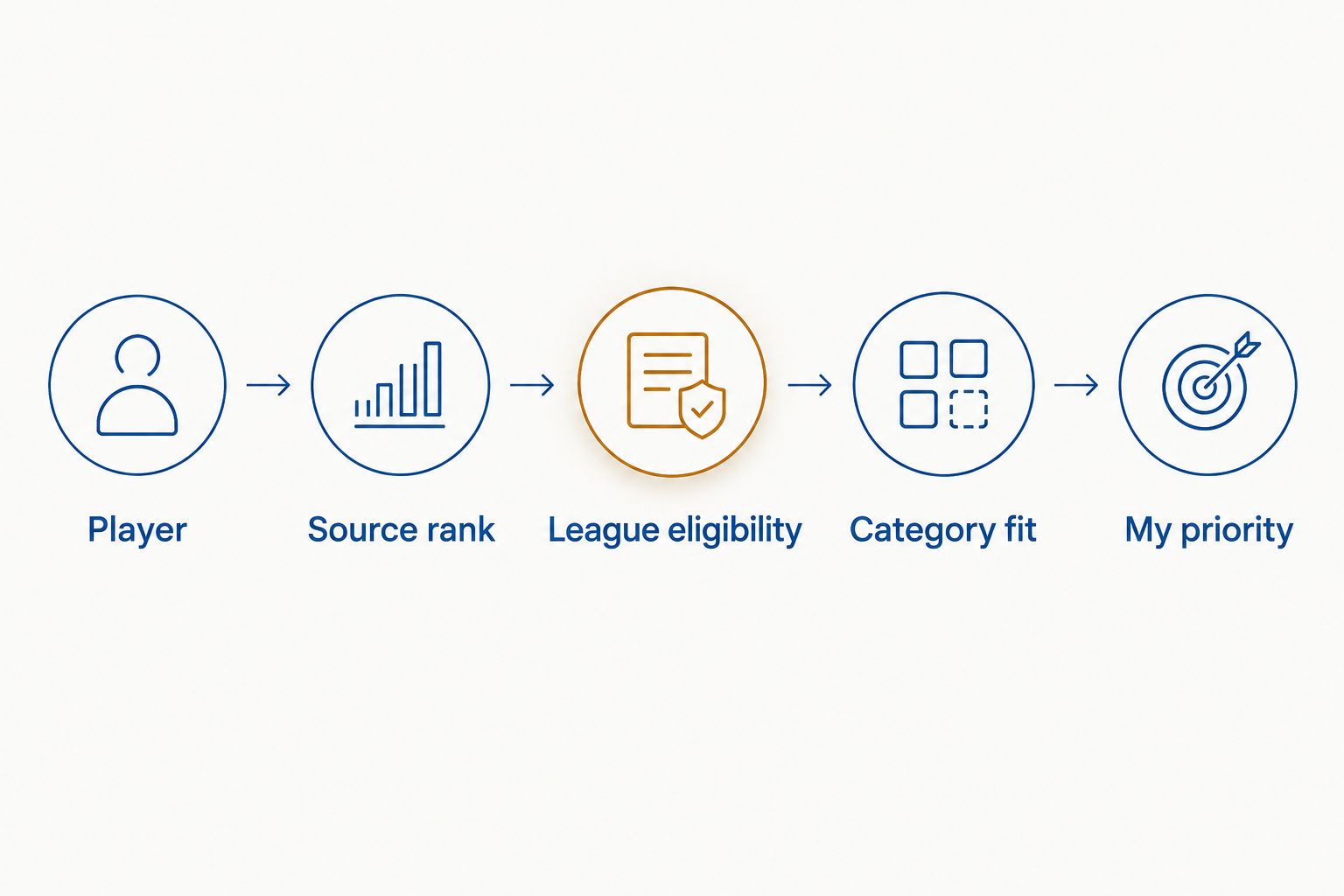
- Create these column headers in the first row: Player, Position, Team, Source rank, League eligibility, Category fit, Status and My priority. These are headers you create, not fields supplied by SportsOrca.
- Enter the players you want to consider, retaining their order in Source rank. Add each player’s position and team only after checking the source you are using. Leave My priority blank until you apply your league settings.
- Select your header row, then choose Data and Create a filter. Use the filter on Status to hide players once you mark them drafted. Sort My priority when you want your adjusted board; sort Source rank when you want to revisit the starting order.
Expected result: the sheet shows an unchanged reference rank beside your own draft order. A player moving up your board no longer erases where the player started.
Name your statuses before the first pick: Available, Drafted and Watch are enough. Watch means you want another health, role or eligibility check. It is not a claim that the player is unavailable.
Configure league scoring
This is where a 2026 ranking becomes your fantasy cheat sheet. A points league and a category league ask different questions of the same player. Do not copy one universal order into both.
| Scoring format | Best for | What to put beside the rank | Advantage | Limitation |
|---|---|---|---|---|
| Points league | Drafters whose league converts statistics into a single fantasy score | League-specific projected points, if you have a source that uses your exact settings | One comparable scoring result | A projection using different scoring rules can mislead |
| Category league | Drafters competing across individual statistics | Category strengths, weaknesses and roster fit | Shows how a player changes your team profile | Requires more judgment than a single ordered list |
A common category setup counts 9 categories: points, rebounds, assists, steals, blocks, three-pointers made, field-goal percentage, free-throw percentage and turnovers. An 8-category setup excludes turnovers. Check your league rather than assuming either format applies. That single rule changes how you treat players whose value depends partly on turnovers.
- Copy the exact scoring categories or points rules from your league into a separate area of the sheet. Do not replace them with a generic fantasy scoring template.
- For a points league, enter a projection in Category fit only if its source uses your league’s settings. Otherwise, use that field to note the scoring rules you still need to check; do not invent a projected total.
- For a category league, write short fit notes in Category fit, such as assists or rebounds and blocks. Record a weakness when it matters to your build. Avoid declaring a player a category winner without supporting data.
- Assign My priority after comparing that fit with your roster. Keep the number as your personal ordering, not as an implied statistical projection.
Expected result: two players with nearby source ranks can have different priorities for a stated reason. You can point to a scoring rule or roster need, not just a feeling.
If you need to interpret player measures before writing fit notes, use SportsOrca’s guide to NBA advanced stats for player value. Advanced stats add context; they do not replace your fantasy league’s scoring rules.
Configure availability and roster fit
A good pick on paper can still be the wrong pick for your next slot. The board needs to reflect who is available and who your league lets you place in the lineup.
- Fill League eligibility from your fantasy platform, not from a player’s position in a news headline. If a player qualifies at multiple positions, record the positions your league actually displays.
- Compare each available player with your open starting spots and bench rules. In Category fit, add a brief roster note only where it changes the decision.
- As each pick is announced, change that player’s Status to Drafted. Filter the Status column to show Available and Watch while you make your next selection.
- Revisit My priority when your roster changes. Do not reorder the entire sheet because one player disappeared; adjust the available players competing for the next pick.
Expected result: your filtered board shows players you can still select, with your highest-priority options visible. Status records availability; My priority records preference. Mixing those jobs in one column makes the board harder to trust.
Update the sheet when a player’s situation changes
The second workflow runs between setup and draft night. A 2026 ranking captures an assessment at a point in time. Your cheat sheet needs a deliberate way to handle later information without rewriting the original source rank.
- Keep Source rank unchanged. That column tells you what the initial ranking said, even after you change your mind.
- Review current injury information, expected role and league eligibility before the draft. Put unresolved questions in a note beside the player and set Status to Watch.
- When you resolve the question, change Status back to Available if the player remains in your pool. Adjust My priority only when the new information changes your draft decision.
- Sort the available board by My priority again. Read the accompanying fit note before making the pick; an ordered list without its reason is just another static ranking.
Expected result: new information changes your decision column, while the source column stays intact. You can see whether a player climbed because of league fit, a roster need or an updated assessment.
This matters most when the draft moves quickly. You do not need to remember every reason behind a change. The note and the two rankings preserve it in the row you are already reading.
Troubleshooting the draft board
The top-ranked player does not fit an open roster spot. Check League eligibility against your platform’s rules, then look at the next available player who fits. Do not treat an editorial position label as a substitute for platform eligibility.
A drafted player keeps appearing in the filtered view. Check that the player’s Status matches the status you excluded. Also check that the row sits inside the range covered by Data and Create a filter; a row added outside that range will not follow the same filter.
Your category notes do not explain a priority change. Replace broad labels such as good all-around with the specific categories and roster need driving your choice. If you cannot state the reason, keep the player near the source rank until you can.
A points projection disagrees with the ranking. First compare the projection’s scoring rules with your league settings. A difference is not automatically a mistake; the ranking and the projection answer different questions, and an unmatched scoring system answers the wrong one for your draft.
Your 2026 sheet shows stale eligibility or health notes. Recheck those fields against current league information before the draft. The spreadsheet only reflects the last information you entered.
Customize your workflow
Once the basic board works, make it faster without making it harder to read. Keep short notes for a small group of close decisions rather than writing a scouting report in every row. Add a separate column for the source or date of a health check if you expect to revisit it. Leave the original ranking column alone.
You can also keep a separate view of players who match an upcoming roster need. Filter by League eligibility, then compare the remaining names by My priority. In a category league, read the Category fit notes before you break a close call. In a points league, verify that any scoring projection still matches your settings.
SportsOrca’s NBA analysis belongs in the research stage of this 2026 workflow; the live fantasy board belongs to you. The useful distinction is not which document looks more finished. It is which one answers the question on draft night: Who is available, eligible and valuable under these rules?
FAQ
How do I turn NBA player rankings into a fantasy draft cheat sheet?
Put the rankings in a sheet, keep the source order and add your league’s scoring, position eligibility, player status and personal priority. Filter out drafted players as the draft proceeds.
Are SportsOrca’s NBA rankings a finished fantasy draft board?
No. SportsOrca’s NBA rankings give you a starting order, but your fantasy league’s scoring and roster rules determine how that order should change.
Should I use the same cheat sheet for points and category leagues?
No. A points league combines statistics under its scoring rules, while a category league rewards performance across separate categories. Configure the sheet for the league you are drafting in.
What is the difference between 8-category and 9-category fantasy basketball?
A common 9-category format counts turnovers, while an 8-category format excludes them. Check your league settings before adjusting a player’s priority.
What should I do when a player is drafted ahead of my pick?
Mark the player as Drafted and filter that status out of your available-player view. Then compare the remaining players against your roster needs and league eligibility.
Should an injury report change the original ranking in my sheet?
No. Preserve the source rank and change your own priority or watch status after checking current information. That keeps the original reference separate from your draft decision.
How often should I update a 2026 fantasy draft cheat sheet?
Review health, role and position eligibility before your draft, then update drafted status as picks occur. A saved sheet does not refresh those fields on its own.
One last thing
Do not let a sorted column make the decision for you. The strongest 2026 cheat sheet keeps the disagreement visible: Source rank says where a player began, while My priority says where that player fits your league and roster now. When those numbers differ, the note between them should explain why.